library(ellmer)
library(jsonlite)

Sys.setenv(OPENROUTER_API_KEY = "sk-or-...")

# Check https://openrouter.ai/models for current model names
model <- "anthropic/claude-haiku-5.5"41 Make an agent: build the loop by hand
By now the word “agent” has come up a lot — Copilot’s agent mode, Cline, Claude Code. It’s tempting to imagine something mysterious going on inside them. It isn’t. As Hadley Wickham put it in a recent post, “A coding agent is six functions in a trenchcoat”: strip away the marketing and a coding agent is a handful of plain functions — read a file, write a file, run a shell command — wired up to an LLM that gets to call them in a loop. Everything else (the fancy chat UI, the permission prompts, the diff viewer) is scaffolding around that simple core.
We saw the general shape of this loop back in Section 2: the model responds, your software inspects the response, runs whatever tool was requested, and feeds the result back — round and round until the model decides it’s done. Here we’ll build that ourselves, in R, writing every piece of it by hand. Nothing is hidden: you write the while loop, you parse the tool call out of the text, you decide whether to run it.
The sections below build up the same picture step by step: we start with a plain chat, then add a tool, then close the loop, and finally wrap it all in a function we can run experiments with. Run the chunks one at a time in an interactive R session — the loop asks for your approval at the console, so it won’t work in a knitted document.
41.1 Setup
Get some example ecological data for the agent to find and save it to a data/ sub-directory. I’ll use this data
dir.create("data", showWarnings = FALSE)
url <- "https://raw.githubusercontent.com/cbrown5/example-ecological-data/refs/heads/main/data/benthic-reefs-and-fish/fish-coral-cover-sites.csv"
download.file(url, "data/fish-coral-cover-sites.csv")
41.2 1. Chat with a system message
A plain chat is a round trip. The chat object sits between you and the LLM and remembers everything said so far, which is why the second question below works.

chat <- chat_openrouter(
    model = model,
    system_prompt = "You are a helpful assistant for R users. Keep answers short."
)

chat$chat("How do I list the files in a folder in R?")
# The chat object keeps the conversation history
chat$chat("What did I just ask you?")
chat41.3 2. Describe a tool to the LLM
An LLM cannot run R code. All it can do is ask, in text, for a tool to be run. At this stage you are the loop: you read the request, run the function yourself, and paste the result back.

system_prompt <- '
You are an agent working inside an R session.
You can use this tool:

{"name": "list_files",
 "description": "List all files in a directory (searches sub-directories too).",
 "inputSchema": {
   "type": "object",
   "properties": {"path": {"type": "string", "description": "Directory to list"}},
   "required": ["path"]}}

To use the tool, first explain your reasoning in plain text.
Then write the tool call as JSON inside <tool_call> tags, like this:
<tool_call>{"name": "list_files", "arguments": {"path": "some/folder"}}</tool_call>
'

chat <- chat_openrouter(model = model, system_prompt = system_prompt)

chat$chat("What files are in my working directory?")
41.4 3. Write the tool function
list_files <- function(path) {
    files <- list.files(path, recursive = TRUE)
    paste(files, collapse = "\n")
}

list_files(".")
# You are the loop: run the tool yourself and send the result back
result <- list_files(".")
chat$chat(result)41.5 4. Parse the tool call
reply <- chat$chat("What files are in the data folder?")
reply <- as.character(reply)

# Grab the text between <tool_call> and </tool_call>
json_text <- regmatches(reply, regexec("(?s)<tool_call>(.*)</tool_call>", reply, perl = TRUE))[[1]][2]
json_text
tool_call <- fromJSON(json_text, simplifyVector = FALSE)
str(tool_call)41.6 5. The loop
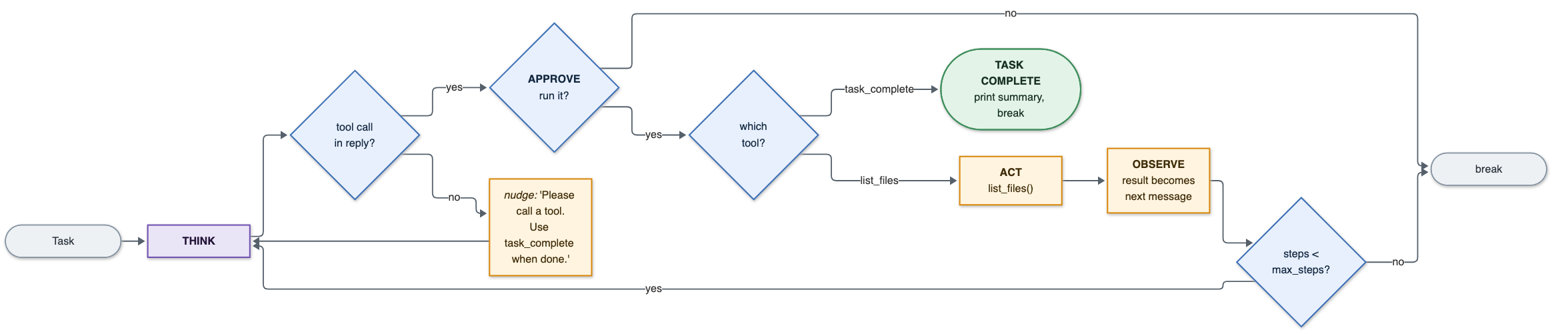
Now we automate the part you were doing by hand. Each pass is THINK, APPROVE, ACT, OBSERVE: the result of the tool becomes the next message to the LLM, and max_steps stops it running away.

chat <- chat_openrouter(model = model, system_prompt = system_prompt)

message_to_llm <- "Find any CSV files in this folder."
steps <- 0
tool_calls <- 0
max_steps <- 5

while (steps < max_steps) {
    steps <- steps + 1
    cat("\n========== Step", steps, "| Tool calls so far:", tool_calls, "==========\n")

    # THINK
    reply <- as.character(chat$chat(message_to_llm, echo = "none"))
    cat(reply, "\n")

    json_text <- regmatches(reply, regexec("(?s)<tool_call>(.*)</tool_call>", reply, perl = TRUE))[[1]][2]
    if (is.na(json_text)) break # no tool call, so the LLM thinks it is done

    tool_call <- fromJSON(json_text, simplifyVector = FALSE)

    # APPROVE
    answer <- readline("Run this tool? [y/n]: ")
    if (answer != "y") break

    # ACT
    tool_calls <- tool_calls + 1
    result <- list_files(tool_call$arguments$path)
    cat("Result:\n", result, "\n")

    # OBSERVE
    message_to_llm <- result
}
That APPROVE step is the whole of the permission prompt you see in Copilot or Claude Code. Our agent can only list files so far, but the next tools we add can write files and run code — at which point the approval step is the only thing standing between the LLM and your file system. We come back to this in Making it safer below.
41.7 6. A task completion tool
The loop above can only stop by running out of steps or by the LLM going quiet. A task_complete tool gives it a deliberate way out, so it signals it is done rather than just trailing off.
task_complete <- function(summary) {
    summary
}
system_prompt <- '
You are an agent working inside an R session.
You can use these tools:
{"name": "list_files",
"description": "List all files in a directory (searches sub-directories too).",
"inputSchema": {
"type": "object",
"properties": {"path": {"type": "string", "description": "Directory to list"}},
"required": ["path"]}}
{"name": "task_complete",
"description": "Call this when the task is finished. Give the user a short summary.",
"inputSchema": {
"type": "object",
"properties": {"summary": {"type": "string", "description": "Summary for the user"}},
"required": ["summary"]}}
In each reply, first explain your reasoning in plain text.
Then call ONE tool, as JSON inside <tool_call> tags, like this:
<tool_call>{"name": "list_files", "arguments": {"path": "some/folder"}}</tool_call>
When the task is done, call task_complete.
'chat <- chat_openrouter(model = model, system_prompt = system_prompt)
message_to_llm <- "Find any CSV files in this folder."
steps <- 0
tool_calls <- 0
max_steps <- 5
while (steps < max_steps) {
steps <- steps + 1
cat("\n========== Step", steps, "| Tool calls so far:", tool_calls, "==========\n")
reply <- as.character(chat$chat(message_to_llm, echo = "none"))
cat(reply, "\n")
json_text <- regmatches(reply, regexec("(?s)<tool_call>(.*)</tool_call>", reply, perl = TRUE))[[1]][2]
if (is.na(json_text)) {
message_to_llm <- "Please call a tool. Use task_complete when you are done."
next
}
tool_call <- fromJSON(json_text, simplifyVector = FALSE)
answer <- readline("Run this tool? [y/n]: ")
if (answer != "y") break
tool_calls <- tool_calls + 1
if (tool_call$name == "task_complete") {
cat("\n===== TASK COMPLETE =====\n", task_complete(tool_call$arguments$summary), "\n")
break
}
if (tool_call$name == "list_files") {
result <- list_files(tool_call$arguments$path)
}
cat("Result:\n", result, "\n")
message_to_llm <- result
}41.8 7. Write tool definitions in R
Writing the tool descriptions into the system prompt by hand doesn’t scale past two tools. Instead, define them as R lists and let toJSON() do the formatting:
tool_definitions <- list(
    list(
        name = "list_files",
        description = "List all files in a directory (searches sub-directories too).",
        inputSchema = list(
            type = "object",
            properties = list(
                path = list(type = "string", description = "Directory to list")
            ),
            required = list("path")
        )
    ),
    list(
        name = "task_complete",
        description = "Call this when the task is finished. Give the user a short summary.",
        inputSchema = list(
            type = "object",
            properties = list(
                summary = list(type = "string", description = "Summary for the user")
            ),
            required = list("summary")
        )
    )
)

toJSON(tool_definitions, auto_unbox = TRUE, pretty = TRUE)
tool_instructions <- '
In each reply, first explain your reasoning in plain text.
Then call ONE tool, as JSON inside <tool_call> tags, like this:
<tool_call>{"name": "list_files", "arguments": {"path": "some/folder"}}</tool_call>
When the task is done, call task_complete.
'
system_prompt <- paste0(
"You are an agent working inside an R session.\n",
"You can use these tools:\n",
toJSON(tool_definitions, auto_unbox = TRUE, pretty = TRUE),
"\n",
tool_instructions
)
cat(system_prompt)41.9 8. Choose the tool with switch()
call_tool <- function(name, args) {
    tryCatch(
        switch(name,
            list_files    = list_files(args$path),
            task_complete = task_complete(args$summary),
            paste("Error: unknown tool", name)
        ),
        error = function(e) paste("Error running tool:", conditionMessage(e))
    )
}

call_tool("list_files", list(path = "."))
call_tool("make_coffee", list())
call_tool("list_files", list()) # missing required "path" argument -> R error
Feeding the error back to the LLM as the observation (instead of stopping the loop) lets the agent see what went wrong and try something else, such as supplying a missing argument or picking a different tool.
41.10 9. Test the loop
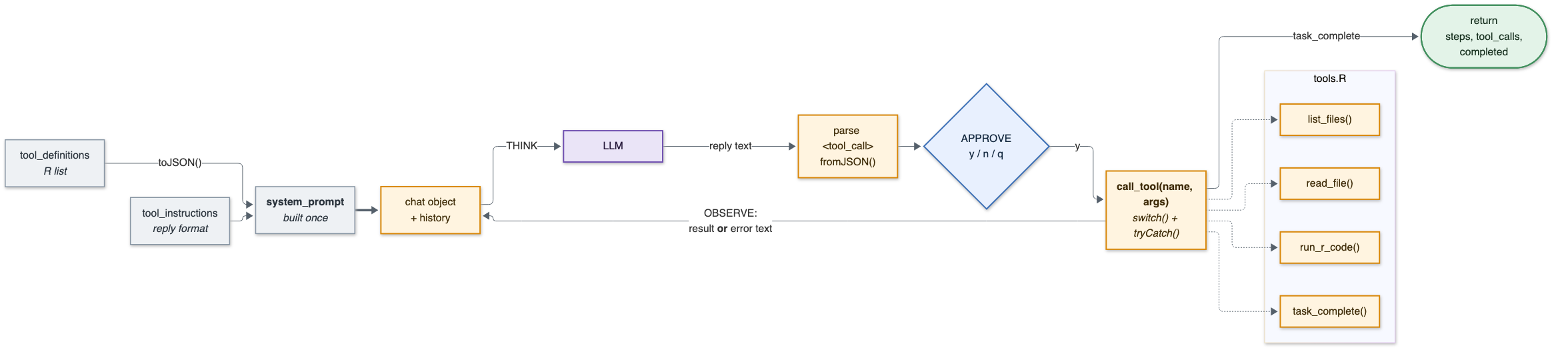
Putting the pieces together: the system prompt is built once from tool_definitions, and inside the loop call_tool() dispatches by name with switch(). Because it is wrapped in tryCatch(), a tool error becomes ordinary observation text and the LLM gets a chance to recover.
run_agent <- function(chat, task, max_steps = 10) {
    message_to_llm <- task
    steps <- 0
    tool_calls <- 0
    completed <- FALSE

    while (steps < max_steps) {
        steps <- steps + 1
        cat("\n========== Step", steps, "| Tool calls so far:", tool_calls, "==========\n")

        # THINK
        reply <- as.character(chat$chat(message_to_llm, echo = "none"))
        cat(reply, "\n")

        json_text <- regmatches(reply, regexec("(?s)<tool_call>(.*)</tool_call>", reply, perl = TRUE))[[1]][2]
        tool_call <- tryCatch(fromJSON(json_text, simplifyVector = FALSE), error = function(e) NULL)
        if (is.null(tool_call$name)) {
            message_to_llm <- "Please call a tool using <tool_call>{...}</tool_call>. Use task_complete when you are done."
            next
        }

        # APPROVE
        answer <- readline("Run this tool? [y = yes, n = no, q = quit]: ")
        if (answer == "q") break
        if (answer != "y") {
            message_to_llm <- "The user did not approve that tool call."
            next
        }

        # ACT
        tool_calls <- tool_calls + 1
        result <- call_tool(tool_call$name, tool_call$arguments) # errors are caught and returned as text

        if (tool_call$name == "task_complete") {
            completed <- TRUE
            cat("\n===== TASK COMPLETE =====\n", result, "\n")
            break
        }

        # OBSERVE (a tool error lands here too, so the LLM can react to it)
        cat("Result:\n", result, "\n")
        message_to_llm <- result
    }

    data.frame(steps = steps, tool_calls = tool_calls, completed = completed)
}
Note what run_agent() returns: a one-row data frame recording how many steps it took, how many tools it called, and whether it finished deliberately. That’s there so we can run the agent as an experiment — which is what the next chapter does.
chat <- chat_openrouter(model = model, system_prompt = system_prompt)
run_agent(chat, "How many CSV files are in this folder?")
41.11 10. Add the other tools
One tool makes a demo; a handful makes an agent that can actually do analysis. tools.R adds read_file, write_file, edit_file, run_r_script and run_r_code alongside list_files and task_complete — each one a definition plus a plain R function, and a call_tool() that dispatches across all of them. That’s the “six functions in a trenchcoat” in full.
Download it into your project directory (or read it on GitHub first):
download.file(
    "https://raw.githubusercontent.com/cbrown5/AI-assistants-for-scientific-coding/refs/heads/main/resources/section-7/tools.R",
    "tools.R"
)
Read it before you source it. Two of these tools (run_r_script and run_r_code) will run whatever code the LLM hands them. The same warning that applied to the stats bot’s system prompt in Section 7.4 is even more important here, because this file allows the LLM to execute code rather than just print text.
# Defines tool_definitions, all the tool functions, and a new call_tool()
source("tools.R")

sapply(tool_definitions, function(tool) tool$name)
call_tool
system_prompt <- paste0(
"You are an agent working inside an R session.\n",
"You can use these tools:\n",
toJSON(tool_definitions, auto_unbox = TRUE, pretty = TRUE),
"\n",
tool_instructions
)41.12 11. Test: find a CSV and plot it
task <- "Find the CSV file in this folder, make a plot from it and save the plot as a PNG file."

chat <- chat_openrouter(model = model, system_prompt = system_prompt)
run_agent(chat, task, max_steps = 15)list.files(pattern = "\\.png$", recursive = TRUE)That’s a complete coding agent in about a hundred lines of R. The difference between this and Cline or Claude Code is more tools, a nicer interface, and a much more elaborate system prompt (see resources/DIY-stats-bot-system.md in this repo for an example of what a serious system prompt looks like).
41.13 Making it safer
Once tools.R is loaded, our agent will happily write files and run arbitrary R code, including code that hits the internet or deletes things. The approval prompt is what is keeping you safe here. But approval fatigue is a risk, as you have to review everything yourself.
Real agents add a second layer: an allow/deny list of what can run without asking. If you wanted to improve this simple version, the easist fix is to check the arguments inside the tool function before doing anything. For instance, refusing paths outside the working directory in write_file(), or refusing code containing system, unlink or install.packages in run_r_code(). This is the same reasoning behind the sandboxing we covered in Section 4.
ImportantChallenge
Add a guard to run_r_code() that refuses any code containing unlink or system, returning the refusal as a string instead of running it. Remember the refusal text goes back to the LLM as an observation, so write it as a message the agent can act on — then ask the agent to delete a file and watch what it does next.